Back to Browse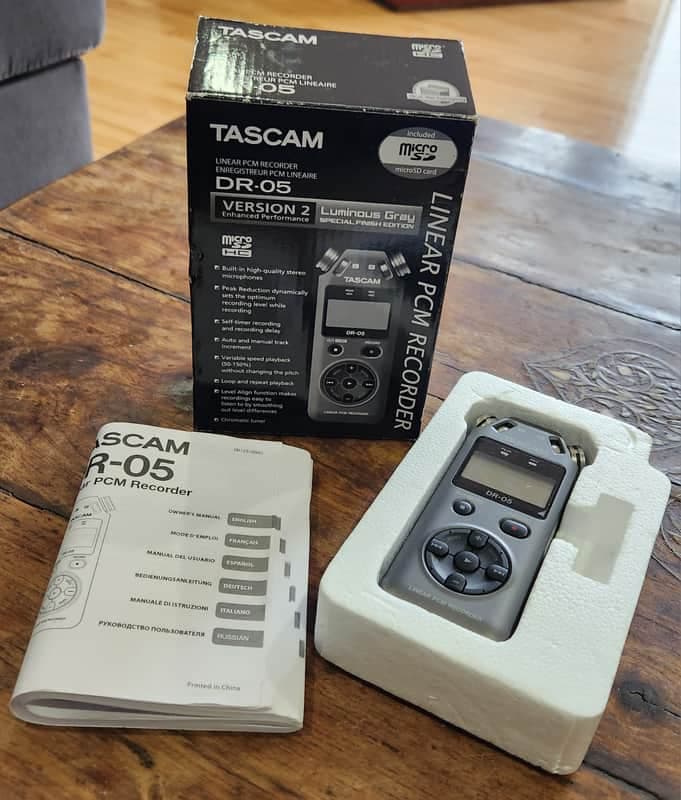
TASCAM DR-05 V2 Portable Recorder 2020s Japan
£73
Very GoodReverb1mo agoLocal pickup available
Sold by
M
Music Man L.A.M.F.
Details
- First Seen
- 28 September 2026
- Last Seen
- 26 November 2026
- Times Seen
- 64
About this listing
TASCAM DR-05 V2 Portable Recorder 2020s Japan is a used item in very good condition, listed on Reverb. The asking price is £73. It is offered by Music Man L.A.M.F. through Reverb. Local pickup is available. It is in our Recorders & Tape category. Used Gear Hunter first saw this listing on 28 September 2026 and last saw it on 26 November 2026. It has been seen 64 times in our scans. Prices are converted from the seller's currency when we scan the listing, so the amount you pay may differ slightly. The seller sets shipping, and import duty or VAT may apply, so check the final cost and the item's details on Reverb before buying.
From the seller
Read through for shipping info. We ship internationally via courier at heavily reduced rates.
See store from our cool finds.
Scroll down for video.
You could refer to the Tascam DR-05 as an “entry level” recorder, but that would be down to its simplicity of use and not because of any lack of professional sounding audio.
Like all digital recorders, the DR-05 is small, light and portable. So it suits the needs of someone who doesn’t want to be tied to any one place for recording interviews or episodes.
It doesn’t have XLR/TRS jacks like many of the higher-end multitrack recorders. The Tascam DR-05 is more of an alternative to the Zoom H1.
The user would be someone who either wants to record directly into the built-in mics, or use an external mic or two which can be added via the 3.5mm (standard headphone connection size) Line-In jack.
Tascam DR-05 review
Look, Feel, & Build
One thing that immediately jumped out when doing this Tascam DR-05 review, was the recorder’s nice, simplistic design. This means it shouldn’t be too intimidating even for the absolute beginner.
Tascam say that it has been designed “to be quick and easy to work with one thumb” – pretty much in the same way you’d hold and use your smartphone.
Recording-wise, there’s two built-in stereo mics on the top of the recorder, pointing to the left and the right.
On the front is a digital display screen for viewing recording levels, menus, settings, etc.
Above the screen you’ll see two LED lights. PEAK lights up when your recording source is too loud for your gain setting, and REC flashes in recording standby and lights up fully when recording.
Under the display window, there are two main buttons. One doubles up as a power on/off and home screen button, whilst the other is a record button.
And on the lower half of the front, there’s the standard multi-purpose Up, Down, Play, Forward, and Back buttons.
Tascam DR-05 menu bottons
Menu Buttons on the Tascam DR-05
There’s four menu buttons on this lower-front section.
MENU – this, funnily enough, opens up the recorder’s menu, where you can access and alter all the recorder’s settings, sound levels, etc.
QUICK – What this brings up depends on what you’re actually doing at the time. Basically it’s to give you quick access to settings for that particular task. For example, if I’m in Recording Standby mode and press Quick it’ll bring up the Level Control menu.
PB CONT – This is Playback Control. Browse back through and listen to all your recordings here. You can change the playback speed too, up to 1.5x speed, and down to 1/2x speed.
MARK – Pressing this whilst recording drops a marker into your audio.
Tascam DR-05
Connecting an External Mic
Between the two stereo mics, there’s a 3.5mm Line In jack.
Here, you can plug in any external mic with a 3.5mm plug. Commonly, these are lavalier mics.
If you want to record on-location interviews then an ideal setup is to use a splitter with two lavalier mics. You can see this in the photo, above.
Tascam DR-5 Review: Other Physical Features
Looking around the side of the recorder, we’ve got…
A standard 3.5mm headphone jack for monitoring your recordings and listening back to them.
How to Start your Podcast
Get our full podcast launch blueprint. Aimed at growth & success.
Get your Guide
how-to-launch.png
A speaker on the back, so you can listen back to recordings without using headphones.
A Hold button, which means you can’t stop or start a recording or alter any settings whilst this is down.
A USB connection port for transferring files or for powering the recorder with an AC adapter.
A Micro SD card slot for your memory card.
A battery compartment on the back, which fits two AA batteries.
There’s a tripod attachment screwhole on the back, and a strap attachment on the bottom of the recorder too.
Main Recording Settings
You can record in MP3 or WAV form.
WAV formats are 16 bit or 24 bit.
MP3 settings are 32, 64, 96, 128, 192, 256, or 320kbps.
Want to know more about bit rates?
You have the option of three different sample rates too. 44,100Hz, 48,000Hz, and 96,000Hz.
You can switch on a Low Cut filter to reduce the impact of unwanted low frequencies (wind noise, mic pops, etc) in your audio.
And you can choose whether to record in mono or stereo.
Other Recording Settings
There’s a Peak Reduction setting to automatically reduce the impact of overly loud sounds in your recording environment.
The Automatic Level Control setting can increase or decrease your gain settings if your recording source is varying between being too loud and too quiet.
And there’s an Overdubbing function, which means you can record on top of a pre-existing audio file on the recorder.
Sound Quality
As part of our Tascam DR-05 review, we recorded two sound samples in our studio.
Neither have had any cleaning up, EQ, etc applied.
The first is through the ‘mobile interview kit’ setup of using two lavalier mics into a splitter.
Here, quality will…