Back to Browse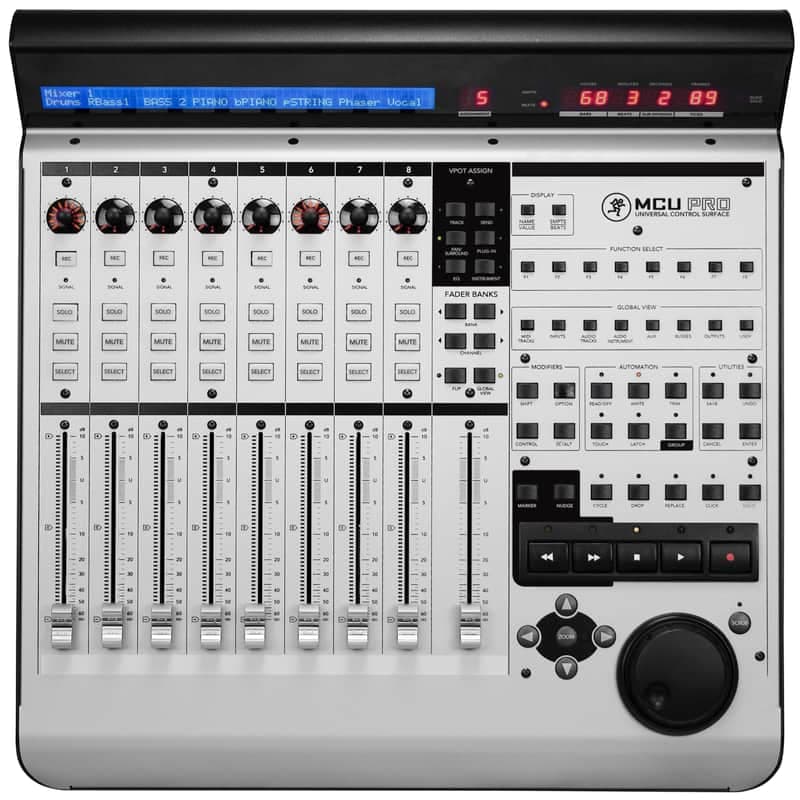
Mackie Control Universal Pro 8-Channel Master Controller with USB, Open Box (Like New)
£940
MintReverb1mo ago
Sold by
Z
zZounds
Details
- First Seen
- 28 September 2026
- Last Seen
- 26 November 2026
- Times Seen
- 64
About this listing
Mackie Control Universal Pro 8-Channel Master Controller with USB, Open Box (Like New) is a used item in mint condition, listed on Reverb. The asking price is £940. It is offered by zZounds through Reverb. It is in our Consoles & Mixers category. Used Gear Hunter first saw this listing on 28 September 2026 and last saw it on 26 November 2026. It has been seen 64 times in our scans. Prices are converted from the seller's currency when we scan the listing, so the amount you pay may differ slightly. The seller sets shipping, and import duty or VAT may apply, so check the final cost and the item's details on Reverb before buying.
From the seller
Compatible with every major DAW and video software out there, Mackie's MCU 8-channel controller puts touch-sensitive 100 mm faders at your fingertips.
Hands-on Mix Control for Almost Any DAW or Video Software!
They call it "Universal" for a reason: the Mackie Control Universal Pro might just be the most widely compatible DAW controller on the planet. Plug in a USB cable, and you've got a control surface that works with every major digital audio workstation software package -- Pro Tools, Logic, Cubase, Nuendo, Ableton Live, Reason, Digital Performer, Adobe Audition, Cakewalk Sonar -- plus several not-so-major DAWs. Software makers love the MCU Pro for its sophisticated Mackie Control communications protocol, which offers nearly ten times the precision of ordinary MIDI mapping. And the MCU Pro now has smoother, quieter 100 mm motorized faders, along with the easy-to-read 55-character display and comfortable jog wheel. With a much more professional look than those little MIDI-mapping keyboards, the expandable Mackie Control Universal Pro is a serious control surface -- no matter which DAW you choose to build your studio around.
History: From HUI to Mackie Control
Mackie is no newcomer to DAW control surfaces. It was Mackie that developed the first HUI (Human User Interface) protocol way back in 1997, when many recording studios were just starting to "go digital." As DAWs proliferated in pro studios, the industry responded with giant software-specific control surfaces (with fat price tags to match). Meanwhile, Mackie introduced the Mackie Control protocol to provide deep two-way communication with many DAW platforms and non-linear editors -- even on control surfaces within the means of smaller studios. Most mapping protocols use MIDI messages to control your DAW's virtual mixer, but while MIDI parameters only have values from 0 to 127, Mackie Control works with values from 0 to 1,023 -- far better resolution for finer adjustments. Mackie Control has been around for a decade now, and judging by how it's been embraced by users and hardware/software companies alike, it's here to stay. When you turn on your MCU Pro for the first time, it will prompt you to choose Mackie Control, HUI, or Logic Control -- whichever mode suits your DAW best.
Easy-To-Use Tactile Control with Visual Confirmation
The MCU isn't only notable for its industry-standard mapping protocol. As a Mackie product, it's known for its robust build quality and easy-to-use layout. There's a large, seven-segment display for timecode or bars/beats/ticks, and two-line, 55-character backlit LCD that displays track names, meters, I/O assignments, plug-ins -- whatever your software tells the MCU Pro to display -- so you can tweak knobs and faders without having to check your computer screen to see what you're tweaking. You get dedicated transport controls, zoom buttons, and a fat jog/shuttle wheel that's tall enough to grip on its sides or spin with a finger on top. The MCU Pro's nine touch-sensitive Alps motorized faders use a belt with teeth and gears instead of the thin string found on lesser-quality units, for a faster, smoother response. And above the 100 mm faders, each channel strip has illuminated Select, Mute, Solo and Record buttons, illuminated "pushable" rotary encoders, and LEDs that light up when audio or MIDI signal is present.
Lexan Overlays: Label Your MCU Pro for Your DAW
Your MCU Pro ships with a collection of Lexan overlays: thin sheets that fit over your MCU Pro's master section to label your controls with DAW-specific nomenclature. Choose an overlay for Pro Tools, Cubase/Nuendo, Digital Performer, or Cakewalk Sonar. The overlays stick on with a light adhesive that leaves no residue, so you can re-stick them again and again for switching between programs. Mackie's parts department stocks overlays for several more supported platforms, and Apple Logic needs no overlay -- its functions are already silk-screened on the face of the MCU Pro. In fact, if you're a video editor, the MCU Pro even works with Apple's Final Cut Pro! Now, it's easy to see which buttons, faders, and knobs control parameters in your application of choice -- as if the MCU Pro was made just for you.
Add More Faders with Optional Extender Units
True, the MCU Pro lets you bank between all the channels in your session. But now that you're mixing on real faders, you might just want more to play with. Luckily, it's easy to extend your control surface by eight more faders with the optional Mackie Control Extender Pro and a pair of short MIDI cables. Beyond its USB port, your MCU Pro has three pairs of standard 5-pin MIDI I/O jacks in the back, so you can connect other MIDI gear you may have kicking around -- even an external MIDI interface, and an unlimited number of Mackie Control Extender Pro units. As for the main MCU Pro itself, it connects to your computer with a single USB cable -- and the MCU Pro is class-compliant MIDI device, so you won't need to install any…